
About IJIO
The International Junior Informatics Olympiad (IO) is a prestigious global competition designed to inspire and challenge young students in the exciting fields of computer cience, computational thinking, and problem-solving. Bringing together bright minds from around the world, IlO provides an opportunity for junior participants to showcase their talents, creativity, and logical reasoning through engaging informatics challenges.
Unlike traditional exams, IJO emphasizes both algorithmic thinking and practical application, encouraging students to explore how computing concepts can be applied to solve real-world problems. The competition fosters innovation, teamwork, and perseverance, empowering students to develop skills that will prepare them for the digital future.
With participants representing diverse cultures and educational systems, IJO is not just a competition— it is also a global platform for collaboration and learning, where young talents can exchange ideas, broaden their horizons, and build lasting friendships.
Objectives
Foster Creativity and Resourcefulness: Encourage students to exercise their creativity and resourcefulness by brainstorming innovative ideas for using readily available household materials to accommodate the size and weight of the micro:bit in various inventive ways.
- Promote Iterrative Design: Challenge students to test and iterate their designs using different materials and sizes, aiming to create an optimal solution for the micro:bit. This iterative process fosters problem-solving skills and a deep understanding of design principles.
- Develop Technical Skills: Equip students with the practical knowledge of how to download programs and transfer them to the micro:bit, allowing them to execute and interact with their own coded projects on the micro:bit platform.
- Cultivate Design Thinking: Introduce students to the design thinking process, which involves empathizing with user needs and defining problem statements. Through this approach, students will develop a deeper understanding of real-world challenges and user requirements.
- Apply Creative Problem Solving: Encourage students to apply their newfound understanding and creative thinking skills. This hands-on application of knowledge allows them to solve a problem or meet a user need in a creative and engaging manner, applying design thinking principles.
Overall, the objective of the INTERNATIONAL JUNIOR INFORMATICS OLYMPIAD is to provide students with a multifaceted learning experience that encompasses creativity, technical skills, design thinking, and practical problem-solving, all while using Micro:bit MakeCode as a stimulating and educational platform.
Syllabus for IJIO
- Define algorithms and create simple step-by-step instructions
- Understand the concept of variables and apply them in various scenarios.
- Use conditional statements to make decisions based on given conditions.
- Apply computational thinking skills to solve problems in everyday life.
Software & Hardware Requirements:
1. Hardware :
A laptop which can surf internet via Wi-Fi and with USB port
2. Software :
2.1 Laptop OS:
- Windows: Windows 7+ or higher
- Mac or Chromebook
2.2 Browser: Chrome or Edge
The instructions will prompt you to pair your microbit to your browser and then transfer the code directly to your micro:bit using webUSB
Format of Competition
Individual Challenge Format
Objective:
- To assess and improve individual coding skills.
- To evaluate problem-solving abilities.
- To encourage independent thinking and creativity.
- To assess participants’ ability to apply programming knowledge in real-world scenarios.
Learning Outcome:
- Participants gain proficiency in coding and problem-solving skills, which are essential in real-world applications of technology.
Evaluation by Judges:
- Programs are assessed based on correctness, efficiency, and adherence to the provided requirements.
Competition Date: 13th Dec 2025 Time: 11am to 3pm
Duration: 1 hr

Team Challenge Format
In the previous round, each team member designed individual programs to meet the given objectives. In this round, work as a team to select the best program created by your members. Using the provided materials, build a practical model based on the chosen program and present the final model to the judges.
Divisions by Grade
Grade 1 to Grade 3 – Lower Primary Division Grade 4 to Grade 6 – Upper Primary Division rade 7 to Grade 12 – Secondary & High School Division
Competition Date: 13th Dec 2025 Time: 3pm to 6.30pm
Duration 3 hours

Contest Structure
Individual Challenge Contest Structure
Section I
The student will draw the flowchart diagram on the contest booklet and make sure to review the work before submission to ensure that all components are included.
Instructions for Creating the Flowchart:
- Clear Labels: Use clear and concise labels for each step in the flowchart.
- Flow Indicators: Use arrows to indicate the flow of control between steps.
- Shapes for Actions: Use different shapes (e.g., rectangles for processes, diamonds for decisions, ovals for start/end) to represent different types of actions or decisions.
- Descriptions: Include clear descriptions in the diagram to explain specific parts of the flowchart.
- Testing: Test the flowchart by tracing through it with different input values to ensure it produces the correct output.
- Hand Drawing Materials: You will be provided with pencil and an eraser to draw the flowchart diagram by hand on the contest booklet. All students will receive the same stationary for drawing.
- Neatness and Readability: Marks will be awarded not only for the correctness of the flowchart diagram but also for neatness, including clear and legible symbols and overall readability.
Section II
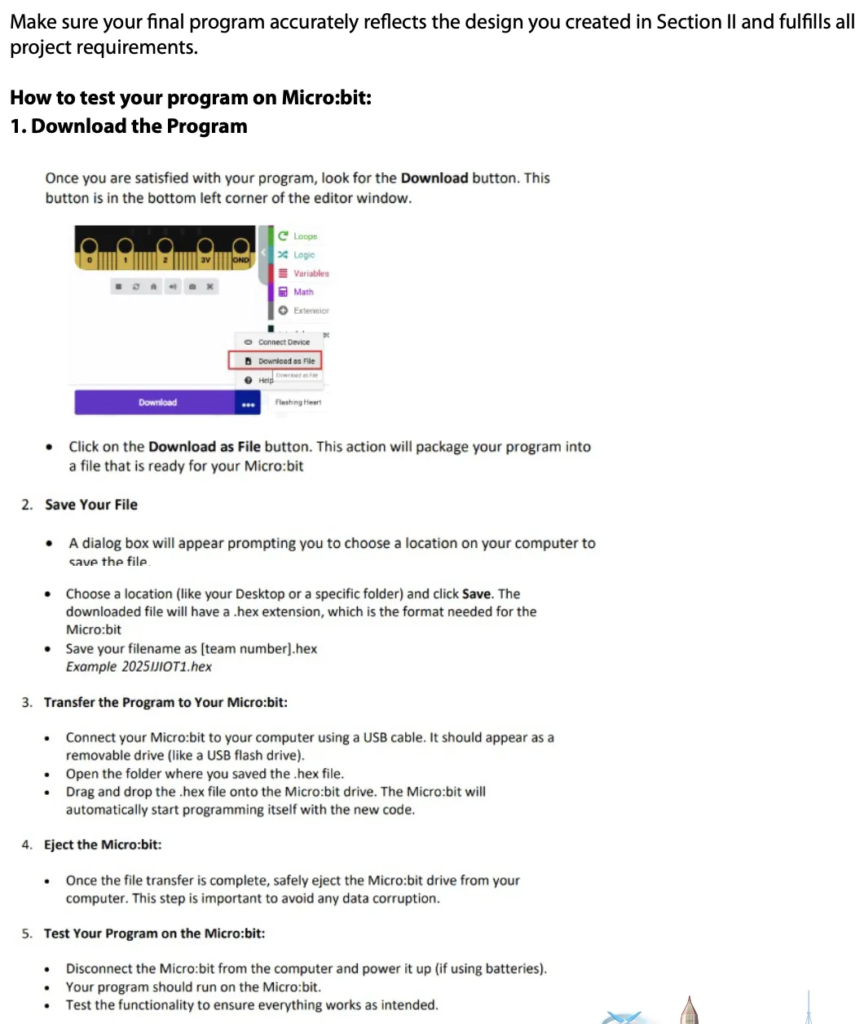
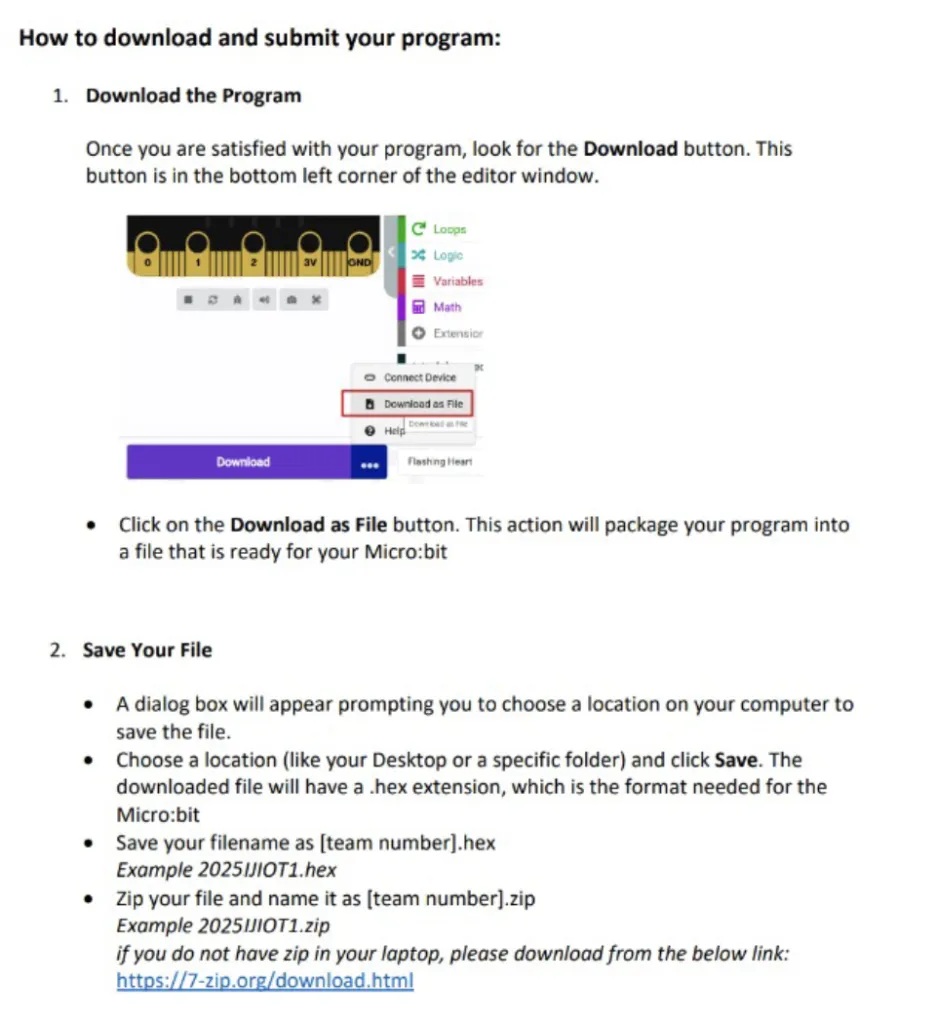
- Choose a location (like your Desktop or a specific folder) and click Save. The downloaded file will have a hex extension, which is the format needed
- Save your filename as[indexnumber].hex
Example 065000123456.hex - Save your filename as[indexnumber].zip
Example 065000123456.zip
if you do not have zip in your laptop, please download from the below link:
https://7-zin.ora/download.html
Submit your Program File to Member Development Portal (MDP)
Upload your program file. How to download and submit:
- Download the Program:
Once you are satisfied with your program, look for the Download button. This button is in the bottom left corner of the editor window.Click on the Download as File button. This action will package your program into a file that is ready for your Micro:bit - A dialog box will appear prompting you to choose a location on your computer to save the file.
Team Challenge Contest Structure
Safety Instructions for Handling Electronic Components and Tools:
Handling Of Electronics: Always handle electronic components, such as the Micro:bit, sensors, and batteries, with care. Ensure your hands are dry to avoid any short Circuits.
Wiring and connections: When connecting wires, be sure to connect them correctly. Incorrect connections can damage the components.
Battery safety: Be careful when handling batteries. Do not short the battery terminals and ensure they are inserted ill the correct orientation.
Use Of Tools: If you are using any tools like scissors or glue, use them responsibly, scissors should be handled with care, and glue should be used in a well-ventilated area.
General Safety: Keep your workspace organized to avoid accidents. If any component or tool is malfunctioning,.stop using it immediately and inform an invigilator.
Teamwork, Effective Communication, and Time Management:
Teamwork: collaborate and share responsibilities equally among team members. Recognize each other’s strengths and delegate tasks accordingly.
Communication: Maintain clear and respectful communication within your team. Listen to each other’s ideas and build upon them. If disagreements arise, resolve them constructively.
Time Management: Be mindful Of the time constraints Plan your activities and divide your time effectively between programming, building the model, and preparing for the presentation. Regularly check the time to Stay on track.
Evaluation Criteria:
Technical Implementation: Focus on the accuracy and efficiency of your programming. Ensure that your program meets the specified objectives and integrates new features seamlessly.
Design Accuracy: your design and Circuit diagram should be precise and reflect a clear understanding of how each component interacts. Accuracy in your design is crucial far a successful build.
Presentation Skills: prepare for a clear and engaging presentation. Each team member should understand and be able to explain different aspects of the project. Practice your presentation to ensure clarity and confidence.
Overall Focus: Remember that the evaluation covers all aspects of the project – from the Technical implementation and design accuracy to teamwork and presentation Skills. Pay attention to each of these areas to excel in the competition.
Awards
IJIO Individual Awards

